Hi Everyone,
We are back with another episode of PKM Weekly. Let’s see what is in store for us today.
Obsidian
V 1.12.2 catalyst
Lots of improvements and updates to the recently released CLI. Bases and other parts of the app have also had some updates. Check it out here: Changelog.
Obsidian Web Clipper 1.0 — now with logic
The Obsidian webclipper has been updated to version 1.0. It includes:
New template logic for conditionals, loops, and variable assignment.
New template validation in the template editor checks for syntax errors.
Add context menu option to copy Markdown to clipboard.
Update to Defuddle 0.7.0 with better support for X articles and more.
My OpenClaw Is Forgetting Everything — Here’s How I Fixed It
Dave talks us through a potential OpenClaw set up - OpenClaw's built-in memory system doesn't deliver on its promise of persistent, forever memory. In this tutorial, I show you how to integrate Obsidian with your OpenClaw agent to create a real, working memory system that actually persists across conversations.
Obsidian With Claude
OP posted a thread on their use of Claude with Obsidian:


Interesting Reddit Posts
Obsidian at a Microsoft 365 Company - I work at a Microsoft 365 company where we heavily utilise PPT, Word, Excel, and Outlook. I love obsidian, but I just wonder how much it would break things. Namely copy and pasting formatting (Headings, tables, etc.) between OneNote and these apps. Is this a practical, one stop shop, note taking tool for someone like me?
I am crazy about obsidian - I am a phd student, 2 years ago (toward the end of my 2nd year) I started to use obsidian, and it literally changed my phd life, I am someone, who is very unorganized, I put stuff and forgot where I put it, I start learning about stuff and then jump to other one, obsidian made my life very easy and enjoyable, I can very easily return to a subject that I started 2 months ago to pick it up where I left, all my stuff are organized in folders, the project updates are saved everything is perfect, I am only missing the ability to take notes by hand in the tablet 🥲, but anyway whoever created and maintaining this I am sooo grateful
Do you find task tracking and management in Obsidian enjoyable? - Do you personally believe Obsidian should be just for notes, or do you also use task tracking plugins? Especially if it’s Task Notes, I’d love to hear tips on your setup.
Thymer
Beta Release Timeline
The tentative plan for beta release was initially around 20 February, but this will not happen. JD clarified that it will likely be in March, as some significant features and numerous smaller fixes are still needed.
“we discussed our roadmap yesterday and there are 9 chunkier things we want to get done before the beta, and a host of smaller fixes. march somewhere for the beta feels about right. but right now every week still makes a huge difference in terms of polish, essential features, etc”
Existing alpha users will automatically gain beta access without needing to re-sign up.
Coming Soon
The Thymer team has been working on several things that will be released soon, if not already released.
Page Properties and Upcoming section visibility is now remembered per collection
Better shortcut support for keyboards with non-latin locale
Zoom in on image view (right click menu and circle menu)
Theme picker polish
MCP server and CLI companion app (thymercli) to connect AI agents and your terminal to Thymer (see thymer.com/mcp)
Create new record from record-link property field when filtered on a collection
Additional icons
Bug fixes
Plugin API:
Bugfixes and extra helper functions
EventsAPI for real-time event handling in plugins
File API for working with files and images in properties and pages
Plugin API to get and set banners, change themes and register new vibe shifts
PluginRecord.moveToCollection() for moving a record to another collection
Join the unofficial Discord.
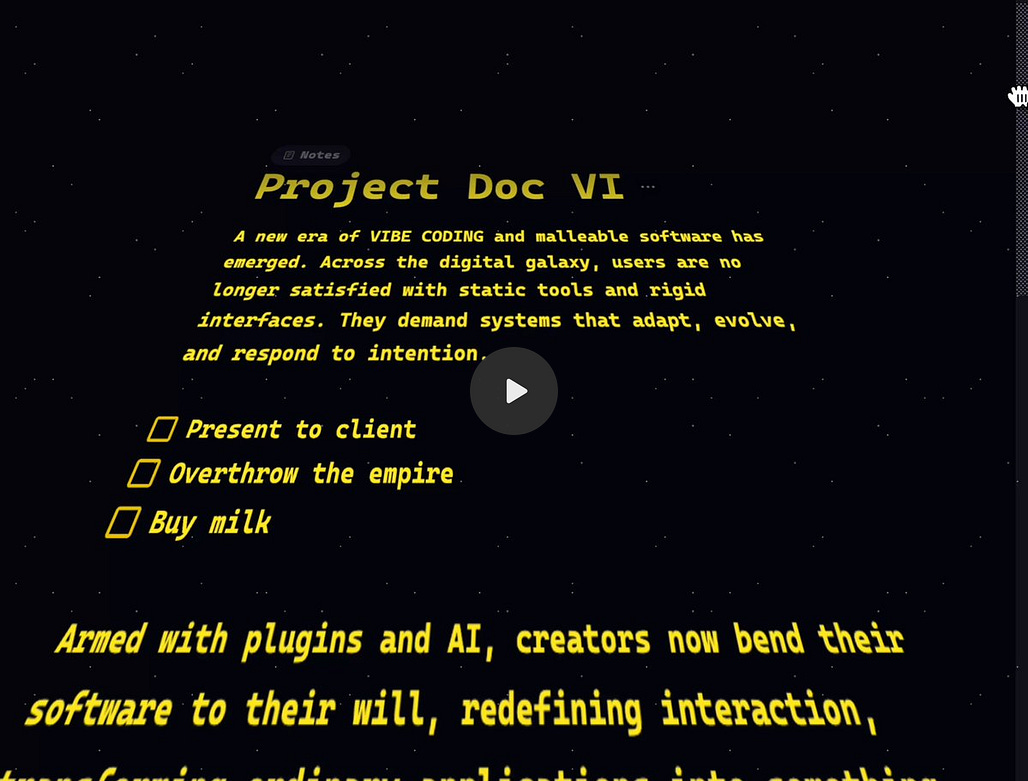
Star Wars Style Notes
Wim showcased a quick plugin to show his notes in a different way:

Capacities
v1.58.53 (2026-02-16)
Capacities have introduced performance improvements across the board following feedback recevied by the community. We reworked the processing of search, linking, queries and the in-app communication. The experience of using Capacities should now be much smoother.
Better mentions: We improved the accuracy of “Mentions” at the bottom of a page. It now only matches full word phrases instead of partial phrases. So a note “Par” will not show mentions of “Paris”.
Better date detection in task titles: You can now mention “June” in your title without it being parsed to June 1 as a date.
It is now possible to keep submenus open even when moving the mouse out of them by clicking on the corresponding parent item.
and other bug fixes too. Changelog.
TANA
Week 2 MCP Competition Winner
Congratulations to Alex as the Week 2 winner.
Alex is a long-time community member and contributor, and he delivered something that has been asking for for a long time: a GitHubstyle visualisation tracker
Tana Tracker Viz — generate GitHub-style contribution graphs from any Tana node, triggered from Claude Code via MCP.
Works with three node types out of the box:
Tracking nodes (habits, supplements, etc.) → binary purple graph, streak stats
Person nodes → intensity green graph, activity breakdown by type (meetings, calls, tasks), could probably do a lot more with this view but I like the longer term view of activity with a particular person and the context of those activities.
Project nodes → intensity green graph, category breakdown (tasks, invoices, documents, etc.). This one was much more resource intensive due to the way Claude found the references as child nodes and parsed the created date. There’s probably a more efficient way to do this one, but this is version 0.1
Check it out here
Systems Lab #3: Self-Driving Tana
In the last Systems Lab, Tana showed us how MCP can be used to help design your Tana schema/ontology.
In this next session, they will tackle the main challenge that comes next: teaching your agent to work with your specific Tana setup reliably and repeatably.
Building an AGENTS.md that reflects your unique tag/field conventions, personal lingo, and operating rules
Creating SKILLS.md files that let your agent query, capture, and update your system correctly
Iterating on this system process so the behaviour gets tighter over time.
When: Wednesday February 25th, 7:30 PM Eastern Time
Where: Google Meet (sign up here: https://luma.com/pxh87rou)
I Let AI Plan My Week. The Results Shocked me
Ev talks about weekly planning and how this used to be one of those things she knew she should do — but never actually did. That was until she connected AI to her knowledge base and turned it into a conversation instead of a chore.
Logseq
Enhance: export edn supports assets
The devs recently implemented an enhancement of export edn supports assets. No details included in the PR, but I am guessing from its title that this will mean that when we export as EDN, our assets (files, images, etc.) will be included, making reimport/reuse of the EDN a lot more functional.
Tabs PR
OP posted a pull request on implementing tabs natively in Logseq rather than rely on plugins.
Logseq is too good of an app to not support tabs on it’s own and rely on a plugin which tries to understand what’s happening in the DOM
cmd/ctrl + click will open the page in new tab
One page can have only one active tab
Keyboard shortcuts
Electron: Closes window when last tab closed in desktop app
Automatically uninstall conflicting plugin logseq-tabs
Auto Hide
Octarine
v0.36.0 out now! Read it - https://octarine.app/changelog/0.36.0
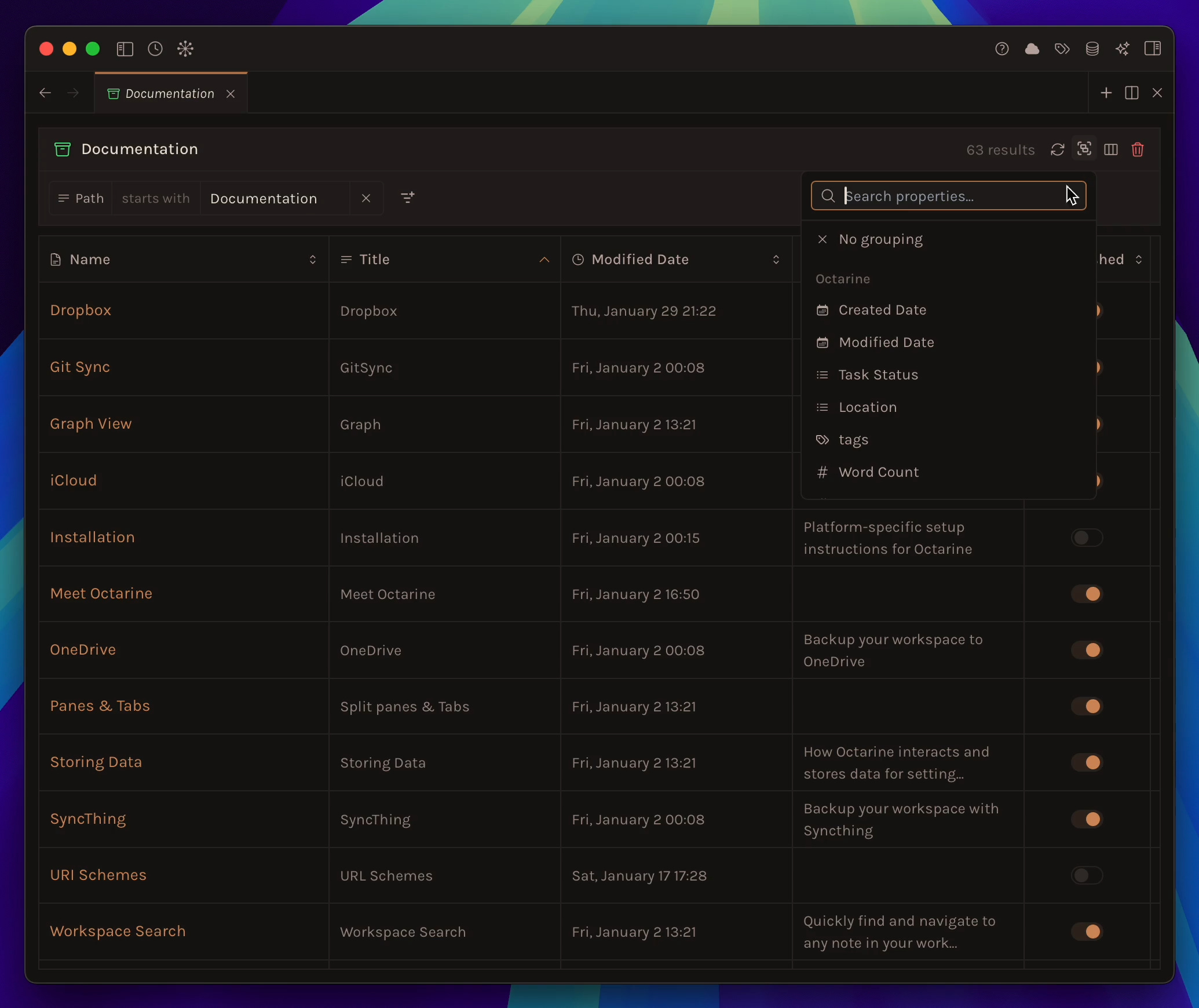
Views can now be grouped using a variety of default and custom properties.
You can click each group header to expand or collapse the group.
Default properties are organized by range, depending on the property
Any changes made to filters must be explicitly saved by clicking
Savebefore they are written to the database. This lets you experiment with different filters without losing your previous setup.
Sidebar Design
A new option, Always show Calendar, is now available under
Settings → Preferences(default: ON).
Improvements
You can now resize table columns in the editor by dragging their edges. The column widths are stored as
HTML Commentsin the markdown file, placed above the table.Ask Octarine now supports
createddate queries such as “notes from last week” or “created before January,” using the actual file creation dates.When the Templates tab is empty, the call-to-action now displays as
Create Template.
Heptabase
Bit of a quiet one in Heptabase on late, but the devs have just released an update that includes:
You can now delete chats (and do other things) from the chat list menu.
Improve AI error messages and make them clearer.
Migrate the data schema to support future features. Please update your Heptabase desktop and mobile apps to the latest version, and refresh your web app to sync.
AnyType
Lots of updates in AnyType V0.54, including:
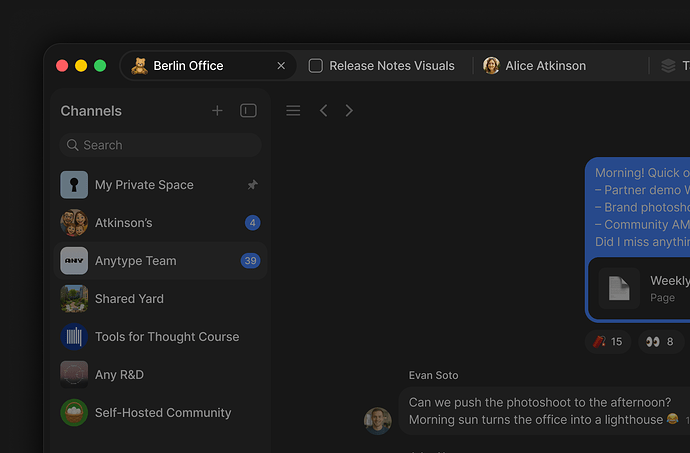
Tabs let you work with multiple objects in the same window,
Filters have been redesigned with cleaner controls and more advanced logic,
Search through chats to find past messages.
Toggled headings,
Dynamic filter values,
Channel ownership transfer
Other updates and refinements.
Tabs
You can now open multiple Objects side by side in a tab bar, just like in a browser. Open any Object in a new tab from the context menu, with Cmd+Click / Ctrl+Click, or from Widgets.
Choose between two modes in Settings > Preferences: Contextual, where the tab bar appears only when you have more than one tab open, or Always visible.
Drag tabs to reorder them, pin important tabs to keep them in place, drag a tab out to open it in a new window, and return to your open tabs when you relaunch the app.
See more - changelog.
Recall
Quiz 2.0 is now available which includes Shared Quizzes.
Given the strong engagement, we decided to invest further, bringing more question types, more flexibility in your review schedule, and our most exciting addition yet: shared quizzes.
Save any content into Recall: YouTube videos, podcasts, PDFs, articles, TikToks, or take your own rich text notes and head over to the quiz tab to get started.
Turn any quiz into a competition by sharing a challenge link. Here are a few that you can take for a spin now:
History of AI - which truly humbled our co-founder Sanks - the results were shocking!
The quiz 2.0 tutorial! Let’s see how much you gathered from the video.
Joplin
Op asks: Joplin as a main notes taking app?
I’ve set up Joplin with a local NAS running Joplin Server, syncing across all my devices (two Linux PCs, a MacBook, iPad, and iPhone). So far, it works like a charm.
I’m now considering fully migrating from Apple Notes and making Joplin my main note-taking ecosystem.
Has anyone here already made that switch? What has your long-term experience been using Joplin as your primary notes app? Any pitfalls, regrets, or things you wish you had known before migrating?
In addition to the above, Joplin will come preloaded on the HMD Terra M. We’re happy to announce a collaboration with HMD Secure, who will preload Joplin on their upcoming device, the HMD Terra M.
This partnership brings Joplin to a new class of rugged, professional devices built for instant, reliable communication and reflects a shared focus on reliability, security, and long-term use.
That’s all for this week. Thank you very much in advance for reading and I look forward to bringing you more PKM news next week.