Hi Everyone,
We are back with another episode of PKM Weekly on this wonderful Valentines day. Let’s see what is in store for us today.
Obsidian
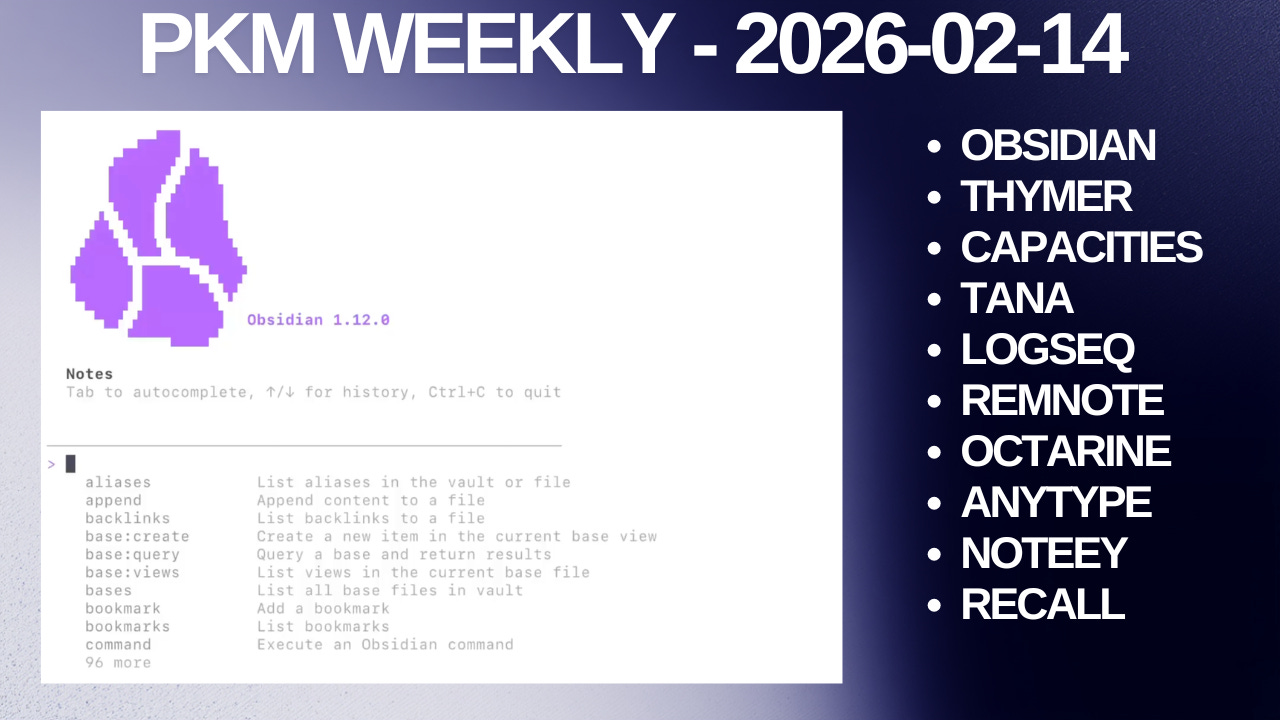
Obsidian CLI (Early Access)
Obsidian CLI is a command line interface that lets you control Obsidian from your terminal for scripting, automation, and integration with external tools.
Anything you can do in Obsidian can be done from the command line. Obsidian CLI even includes developer commands to access developer tools, inspect elements, take screenshots, reload plugins, and more.
See more comments here, and also a great question by TFT Hacker on why use Obsidian CLI rather than something like Claude Code.
Obsidian Roadmap
The Obsidian Active section of the road map has been updated to
Community directory - New website to explore community plugins and themes.
Settings search - Improve navigation and search for settings.
Looking forward to both of these implementations.
Interesting Reddit Posts
I fricking love Obsidian - I love it... so... much... so fcking much... I am an addict now, I can’t imagine my workflow without it, I’ll call my children Obsi, Dian, I don’t care, it’s that good.
Number One feature of Obsidian - What is your number one feature/plugin/dataview, etc that you use most often and could not live without?
Love Obsidian, but can’t come up with a use case - I really like the flexibility of Obsidian, and want to use its features, but I just dont know why. Any advice?
Thymer
Thymer MCP & CLI
True to his word, Wim released the Thymer MCP and CLI this week. Amazing work.

thymercli is a small open-source companion app that provides an MCP server for connecting AI agents to Thymer, along with a command-line interface. It runs locally on your machine and connects to Thymer in your browser or the upcoming desktop app, so you can just use it in combination with the existing end-to-end encrypted sync and real-time collaboration of Thymer.
The Model Context Protocol (MCP) is an open standard that lets AI agents interact with apps and services. Connect your favourite agent - like Claude Code, Cursor, Gemini CLI, and others - and give it direct access to your workspace: querying and updating notes, building databases, modifying views, searching across everything, building plugins, changing themes, and navigating the app, all through natural conversation.
Check it out in full here.
Next Steps
A few projects the team are working on:
launch the MCP bridge+cli app - DONEadd a some more plugin API functions still missing (including event handling)
then (multi-)panel handling on mobile (and narrow desktop windows)
and then start on multi-property support
Flashcards in Thymer
A user created a spaced repetition flashcards plugin for Thymer powered by FSRS.
Create flashcards directly inside your notes using a simple Question :: Answer syntax, then practice them with Anki-style spaced repetition.
Join the unofficial Discord + Reddit.
Capacities
Nightly Program Invites
Users in the nightly group get access to a beta version of the Capacities app for testing and feedback. It gives you a chance to shape the product and be a part of helping us make Capacities better a lot faster. 🌱
Nightly is not about getting early access. If you just want early access to new features, please don’t apply. This isn’t about getting a sneak peek into what we’re working on, but about helping us get features in development to everyone a lot faster.
Contribution is required. If you feel you’re unable to provide active feedback on the new versions we share, please don’t apply. We will be regularly reviewing feedback, and if you don’t provide feedback, we will remove you from the nightly channel, and you will lose access to in-development features.
To apply, fill out this form. We will manually review and process all applications, and individually reach out to users we want to add with the next steps.
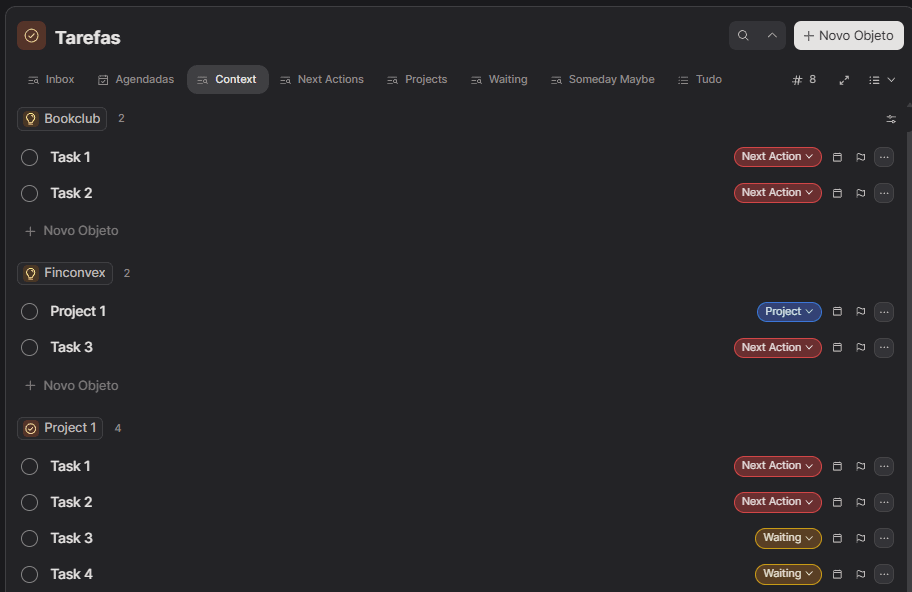
How OP uses GTD in Capacities
OP posted: I was a bit hesitant to move my tasks from Todoist to Capacities, but now I feel the workflow is excellent. I would like to share how I have been using the app to align with the GTD methodology.
Check it out here.
TANA
Tana Current with Matt and Brage, MCP edition
This month's Tana Current is all about the MCP -- the biggest shift in how AI tools talk to each other, and what it means for Tana users.
Tana Producthunt Launch of the year?
Andre posts: It’s been a while! The release of Tana‘s MCP server triggered me to make a new video on how to spar with Claude and your notes.
In this episode, I dive deep into the exciting recent updates released by Tana, particularly focusing on the long-awaited full API and the introduction of the MCP server. The MCP server streamlines the process of connecting AI agents to Tana, making it more accessible than ever before. I provide a step-by-step guide on how to enable this feature after updating the desktop app, which includes navigating to local API settings and quickly getting started with Claude code and Codex.
Latest Update
Released Feb 13, 2026.
Thanks for all the feedback for the local API/MCP! Several improvements, and more coming.
Added open_node MCP tool to navigate and open specific nodes in the Tana UI from external applications.
Enhanced MCP set_field_option and set_field_content tools with append mode and multiple value support. Can now add to existing field values instead of only replacing, and set multiple values on multi-value fields.
Fixed MCP search_nodes not finding nodes by their title expressions, using the build title from fields. Search now indexes and returns results for titles generated from field values too.
ImprovedImproved MCP OAuth redirect for external applications. Now supports app-based redirects for tools like Alter and Cursor, not just localhost URLs.
Fixed MCP tool error when clearing date field values. Date fields can now be properly set to empty using null values through MCP.
and more: Changelog
Logseq
Logseq DB - First impressions
Dario does a First Impressions video on Logseq:
Logseq DB is finally approaching stable beta, and I’ve been testing it out. This video shares my first impressions for existing Logseq users considering the switch from the markdown version. This isn’t a beginner tutorial - it’s an honest assessment for people who know Logseq and want to understand what’s different.
What version are you using?
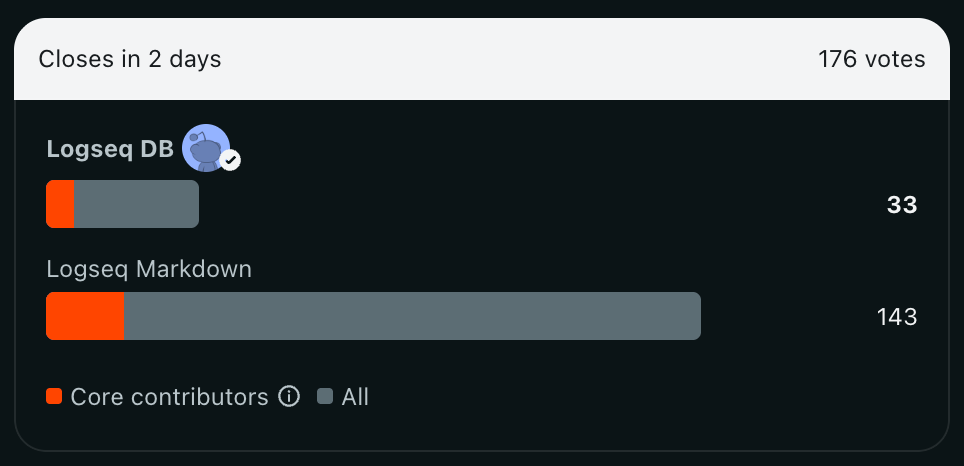
OP posted an interesting poll on Reddit: What [Logseq] version are you using?
Very interesting outcome so far.
RemNote
RemNote 1.23 – Polish, Performance & Power
RemNote 1.23 brings polish, performance, and power throughout the entire app. We’ve been laser-focused on making every corner of RemNote feel instant, powerful, and joyful to use.
Instant Mobile Flashcards - The flashcard home now loads instantly on mobile. Jump into practicing any folder or document without delay.
Faster Mobile Syncing & Performance - RemNote mobile now loads faster, uses less memory, and gets you back into studying faster
Upgraded AI Card Generation - Our new AI-Card generation experience gives higher-quality cards, is easier to use, gives more visibility into AI credits, and makes citations easier to access.
Cleaned-Up Sidebar - We’ve revamped the sidebar for a cleaner, more focused experience
New Print Engine - We’ve fully rebuilt the editor print engine. The new engine supports dynamic screen sizes and layouts, and smoothly handles documents with many images.
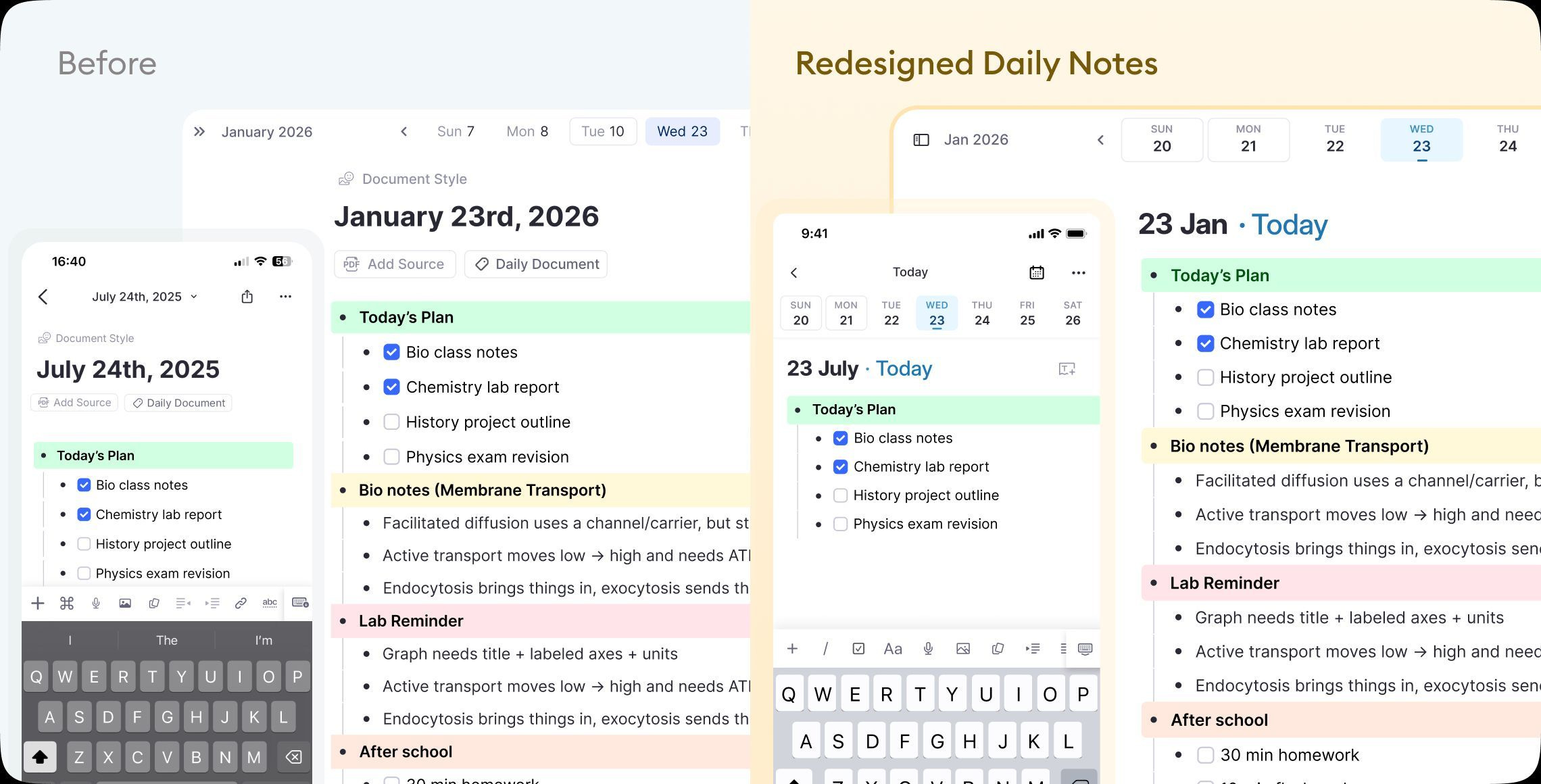
Redesigned Daily Notes - The new daily notes page is cleaner, helping you focus on your work. It also emphasises templates, which you can use to structure your day.
Handwritten Documents Polish - Handwritten documents got a major upgrade with customizable eraser filters, individual document trash, smoother pen input, toolbar layout improvements, custom colours, improved undo/redo UX, performance boosts, and more.
And much more - changelog
Octarine
v0.35.3 is out with a couple of very cool new features.
Extract Text to Note
To extract text to a note, select any range of text, then either click the
+icon in the Bubble Menu or pressCMD/Ctrl + K → Extract Selection to note. This lets you choose where the new note will be created with your selected text.
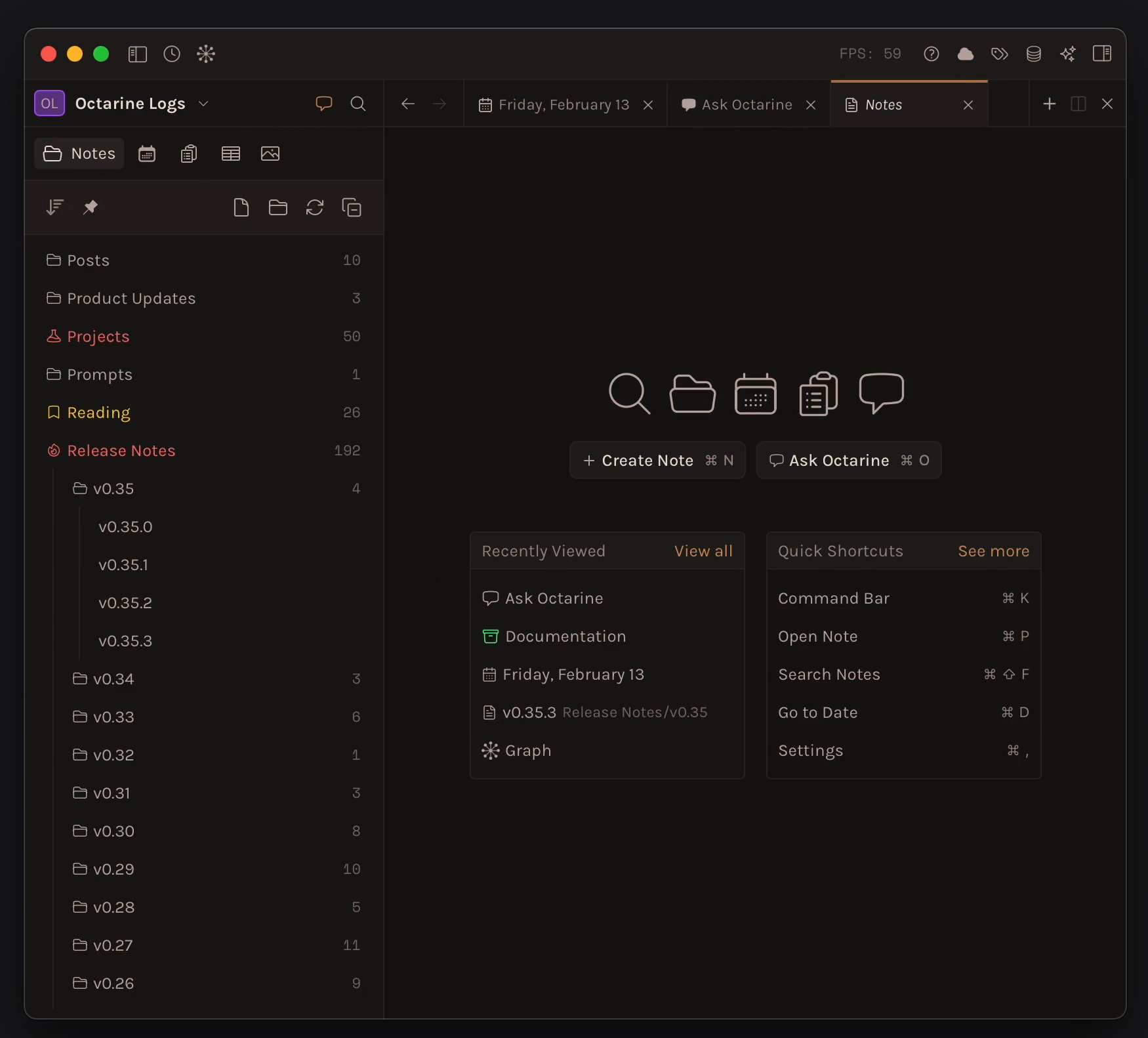
Compact Navigation
A new
Compact Navigationsetting is available inSettings → Preferences. This setting condenses the default navigation buttons into a single row of icons, freeing up more space in the tree view.
And many, many more improvements - changelog.
Anytype
Town Hall on February 17 at 17:00 CET.
What we’ll cover:
Release highlights - We’ll walk through what’s new in the upcoming release. A sneak peek from Desktop: Tabs – so you can work on multiple objects in the same window, a major Filters upgrade with advanced AND/OR logic, Toggled Headings, and the ability to choose whether your templates use pre-filled titles.
Roadmap - We’ll share our plans for the next couple of months and talk through what we’re prioritizing and why.
Q&A - If there’s something you’ve been curious about or wondering, feel free to leave your questions in the comments so we can gather them beforehand. Of course, you’re always welcome to ask during the live session too.
Noteey
V1.47.0 - New Features and Improvements:
Direct Markdown editing on canvas
Card templates
Linking to blocks in card
Popup editing for canvas text and sticky notes
Default tags/projects support for quick note window
Added “All/Favorites/Published” tabs to card library
Improved keyboard shortcut management
Optimized dark mode UI
Improved onboarding flow
Cards remember last used style
Recall
Recall Update Walkthrough: Improved Sidebar, Tagging, and New Features
In this video, Antone provide a walkthrough of his favourite recent updates to Recall, which include changes to the user experience, particularly the sidebar and tagging functionalities. The video also touches on the app’s improved handling of optical or image-based PDFs. He also show why the improvements in the export process matter for Obsidian users.
That’s all for this week. Thank you very much in advance for reading and I look forward to bringing you more PKM news next week.