Hi Everyone,
We are back with another episode of PKM Weekly. Let’s see what is in store for us today.
Thymer
MCP coming soon
Wim posted a quick demo of an MCP in Thymer. He mentioned it is likely to be released/implemented next week, so I'm looking forward to this.

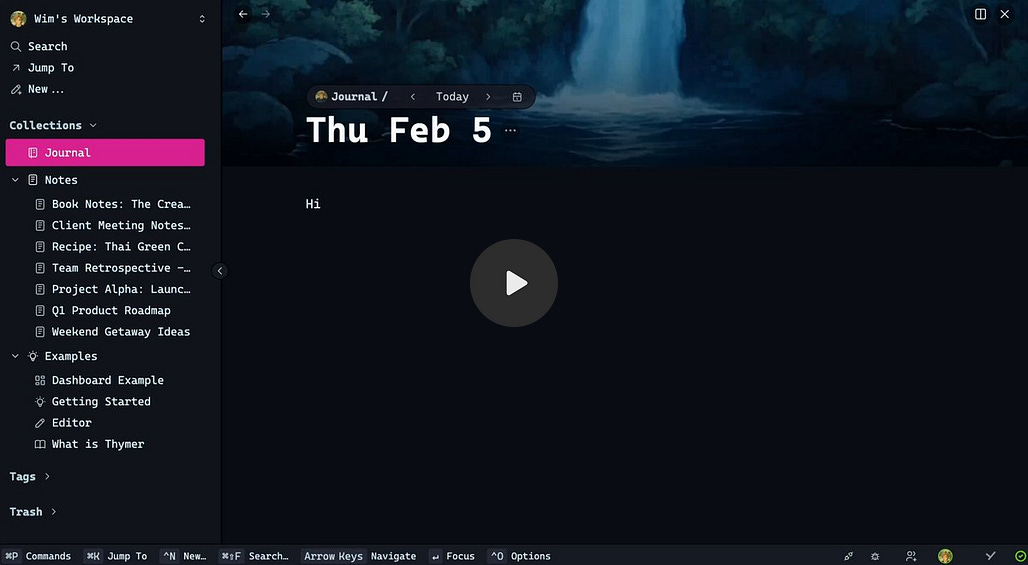
Thymer tour - a quick tour of my Thymer
Daniel posted a video on a little tour of how I am using Thymer currently and my workflows. I will make a more in-depth tutorial on how to set all of this up. I might also do a more in depth tour later as well
Power of Plugins
While I am still in the camp of “core functionality should be part of the app”, the power and ability to play around with plugins in Thymer is amazing. Last night, fired up Claude Code and played around building a graph view for Thymer. I am sure this will be implemented as core functionality in due course, but I love that it allows me to see my notes in different ways.

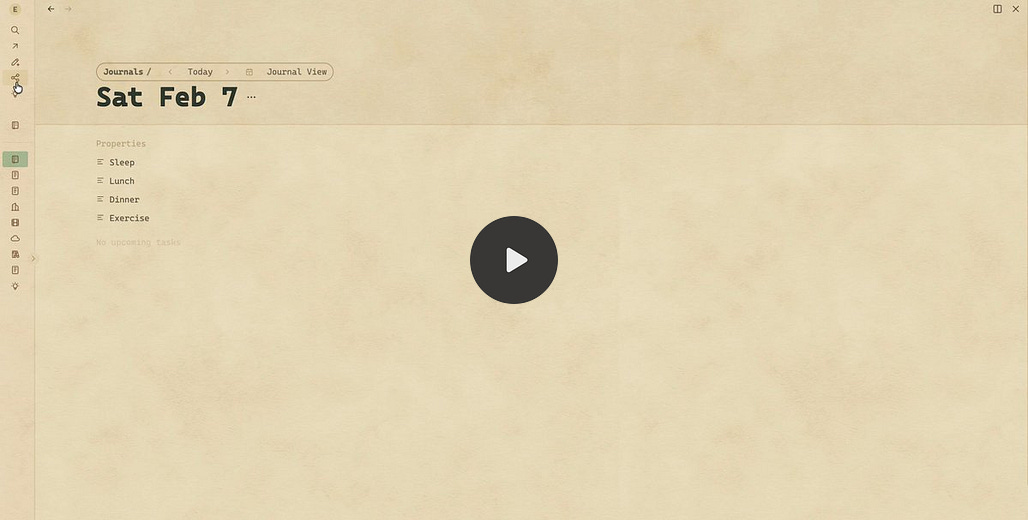

If you want to discuss more about Thymer, or snag an Alpha invite code, please join the unofficial Discord where the devs frequently post code. Having said this, hopefully just a bit longer before the app is opened to everyone in Beta.
Obsidian
V 1.11.7 Desktop and Mobile - Public Release
The help window and the vault chooser window have been updated to match the new design used in app settings.
Bases: Table cell menu now shows “Copy” and “Paste” menu items.
Settings: The sidebar no longer shows icons next to Community plugins.
Added new
choose-vaultURI action to open the vault switcher.
New Appearance settings (enabled by default):
Full screen: Automatically hide interface elements while reading.
Floating navigation: Navigation buttons float over the content instead of being anchored.
Sliding sidebars: Option to have the sidebars slide to the side of the content instead of floating above.
When full-screen mode is enabled, the phone’s status bar is now hidden when you scroll in a note.
New App actions (the menu when you press and hold on the app icon)
Vault switcher has a new option to “Open Vault in Restricted Mode.” This option opens the vault without activating any plugins. If your vault is failing to open due to a plugin issue, use this option to debug.
Improved layout of Keychain settings.
Keychain: Disabled auto-capitalisation on the “secret ID” input field.
Obsidian Just Won
Nick posted a video on Obsidian and its ability to allow you to “activate” AI on your notes, but also giving you the opportunity to not. You are in control.
While other note-taking services are scrambling to integrate AI into their software, Obsidian users just keep writing. In this video, we’re covering why Obsidian is winning the note wars in 2026, and why I predict it will continue to do so for years to come. Watch to the end for my tips to stay ahead with Obsidian.
On this note, Tom also did a similar video: Obsidian + Claude could be game over for hosted tools like Heptabase
Interesting Reddit Posts
I finally gave up on tasks in Obsidian. What are you using? Obsidian is my favourite app. I have my whole like in notes in it. For the year and a half since using it I have been trying to use it for tasks, and I think I have used all the methods (dataview, default tasks, TaskGenius and others). I do need a task app and am wondering what folks are using. If there is something that integrates with Obsidian, but something that works well is what I need now.
Beancount for Obsidian - A personal finance plugin with plain-text accounting - I have been working on a plugin that brings Python’s beancount accounting tool to Obsidian.
Capacities
Updates
New Storage Infrastructure
We rewrote the whole storage infrastructure within the app. This is a major under-the-hood improvement:
Substantially faster startup: The app will need to redownload all content with this update, but from then on it should start up much faster.
Faster content loading: Content loading and calculations are now more efficient.
Please report any issues you experience with the new version on our feedback board. We’d also love to hear any feedback regarding performance.
Improvements
“Add” option for pinned sections: If you hover over a pinned section you can now click on the “+” button to directly add content to that section
Better UI for Aliases: Aliases can now be edited and added like tags. By hitting enter you add a new alias. Backspace removes an alias.
Block linking support for daily notes
Tidy-tree support for Mermaid diagrams
and many more - changelog.
Why do you prefer Capacities?
OP posted:
Like many people, I’ve been going back and forth between Capacities and Obsidian. And I’ve been doing this every week for the last 2 years. It’s safe to say that I’m crazy, but I can’t quite explain why I prefer one over the other.
What draws me to Obsidian is mainly that it’s much more powerful with AI and works better on my Boox tablet. And I use Canvas a lot.
But Capacities has so much less friction and organizes things so much better... The query feature is very powerful, the UX is functional, the two-way linked properties are very useful, etc.
TANA
Tana MCP $1,000 Build Challenge
The new Tana MCP opens up a lot of new possibilities. Working with your Tana data in new ways, connecting to other tools, building automations we probably haven’t even imagined yet. We want to see what you create with it.
How it works: Build something using Tana MCP. Post it in the Slack community. Our team will check out all the submissions and pick the winners.
What’s up for grabs: $1,000 total. 4 prizes, $250 each. Timeline: 4 weeks starting now. No other restrictions - if you’re using Tana MCP, it counts.
We’ve always had incredible builders in this community, and now there’s a whole new surface area to explore. Curious what you’ll come up with.
Check out the docs here: https://tana.inc/docs/local-api-mcp
If you want a Tana + MCP: The Ultimate AI Workflow We’ve Been Waiting For - check this video out by Ev.
So the official Tana MCP is out, how are you guys using it?
OP asked: So that begs the question, how are you using the new MCP server?
At the moment it seems to work locally on the desktop; there’s been an influx of people connecting it to Claude Code or in my case - Google Antigravity/Gemini CLI.
Systems Lab #2: Multiplayer Mode
When you’re coordinating people, projects, and priorities, it’s easy for context to get lost and follow-ups to slip. Whether you’re managing a lot of moving parts on your own or collaborating with others, this session will focus on systems you can use right now to increase clarity, alignment, and trust.
When: Next Wednesday, February 11th, 7:30 PM Eastern Time
Where: Google Meet (sign up here: https://luma.com/74sfpu2h)
What will be covered:
Shared Workspace Setup - How to structure tags/fields/nodes in a shared workspace, what must live there for visibility, and the privacy/sharing nuances that matter.
Business Hierarchy for Knowledge + Tasks - A simple model for organising work (areas → projects → tasks) and assigning ownership without fragmentation.
Operating the System - Once the structure is set, we’ll map the mental manufacturing process: how inputs (meetings, messages, notes) become decisions, owners, and next actions while triage, follow-ups, and status visibility are embedded into the process that keeps everything moving.
Octarine
0.35.1 out now!
Create Workspace
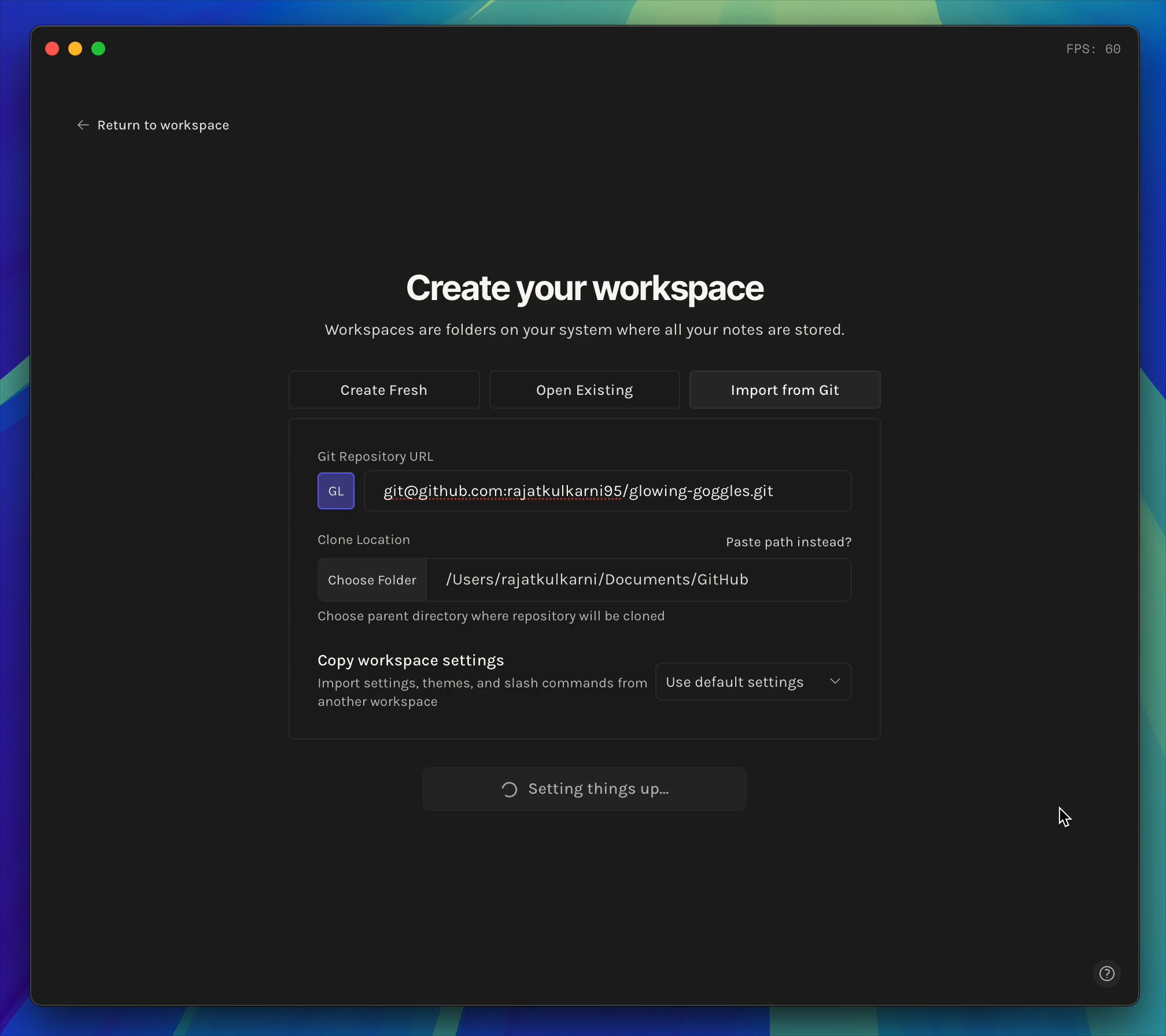
The “Create” flow is now divided into three options:
Create Fresh: Sets up a brand new workspace folder on your device, complete with a Welcome note and a Daily folder.
Open Existing: Allows you to select and open an existing folder containing markdown files as your workspace.
Import from Git: Clones a remote Git repository to your device and opens it as a workspace.
Custom themes are also copied over to the new workspace if
Copy workspace settingsis selected.
Improvements
Navigating to a heading in the outline now automatically expands collapsed parent sections.
Code block actions are now shown only on hover for a cleaner editing experience. Reduced empty space at the top of the codeblock.
Fixed an issue where deleting the workspace folder from Finder/Explorer would not show the
Workspace deleteddialog and instead recreate the folder back with.octarinefolder present inside.Ask Octarine— Removed mxbai embedding model options (no longer supported).Ask Octarine— Fixed memory leak in suggested prompts cache.Removed font options being shown in the Command bar under
Change Interface Font. The option now takes you toSettings → Preferences
Reflect
AI chat feature to the iOS app! That means you can now chat with all of your notes right from your phone.
The new AI chat on iOS mirrors the desktop functionality. Namely, we let you chat to search results.
Here’s how it works:
Open the search by clicking “All” in the bottom menu.
Search and add any filters you want (tag, pinned notes, daily notes, etc).
Click on the Chat button to converse with your notes!
Craft
Craft Agents 0.3.1 just shipped, and the team has created a walkthrough of what's useful about it.
The core idea: one desktop app that connects to all your stuff — GitHub, Calendar, Slack, your docs, local files — and lets you work across all of them in a single conversation. No more copy-pasting context between tools.
Remnote
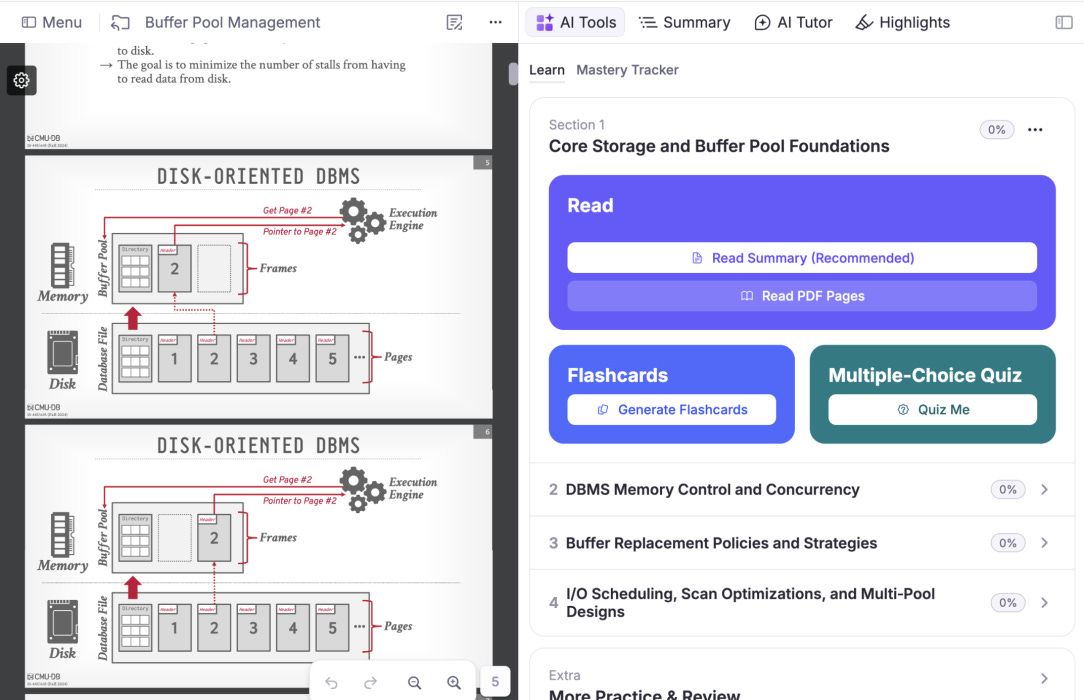
In addition to tons of general polish and upgrades, we’ve recently built out a new beta “Guided Learning Mode” for PDFs. This mode:
Breaks down your PDF into sections
Analyzes and understands the key topics you need to understand for each section
Creates an easy-to-read interactive summary
Makes flashcards
Provides an interactive quiz.
As you go through your flashcards & quiz, the mode tracks which of the key topics you’ve mastered or not, and targets your next questions on those. We’re looking for feedback! This can be enabled on 1.22.77 in settings > labs > “guided reading mode”.
Griply
Desktop
• Added a + button in sections to quickly add a new task.
• The 4-day calendar view now always starts on Today.
• Sections added to a goal without any tasks were not showing.
• Grouping tasks by goal inside a goal didn’t show subgoals when no tasks had been created yet.
• When a habit is completed, skipped, or failed today, we now show the next occurrence below the habit.
• Fixed a bug where habits completed today were still shown when the date filter was set to Today.
• Hover over a calendar event with a long name to see its full title in a tooltip.
• Enable or disable push notifications per web browser and separately in the desktop app.
iOS
• Time-sensitive push notifications are now supported.
• Reordering tasks in Today didn’t work in some cases.
• The to-do widget didn’t open the New Task sheet when Face ID was enabled.
We’re also working on push notifications reliability, UX improvements for better habit scheduling and some other fixes. Next up is shared goals and two-way calendar sync.
That’s all for this week. Thank you very much in advance for reading and I look forward to bringing you more PKM news next week.