Hi Everyone,
Merry Christmas.
We are back with another episode of PKM Weekly. Let’s see what is in store for us today.
Thymer
Thymer really does exist
Christmas definitely came early, as just before the bells rang in, the devs started issuing invites to people when they announced the Thymer Alpha.
If you have not already received an invite, keep an eye on your Twitter DMs / emails and also make sure you follow @wcools and @jdvhouten.
Be sure to also follow the unofficial Discord (and subreddit). The devs are active in Discord and posting responses as well as the occasional invites.
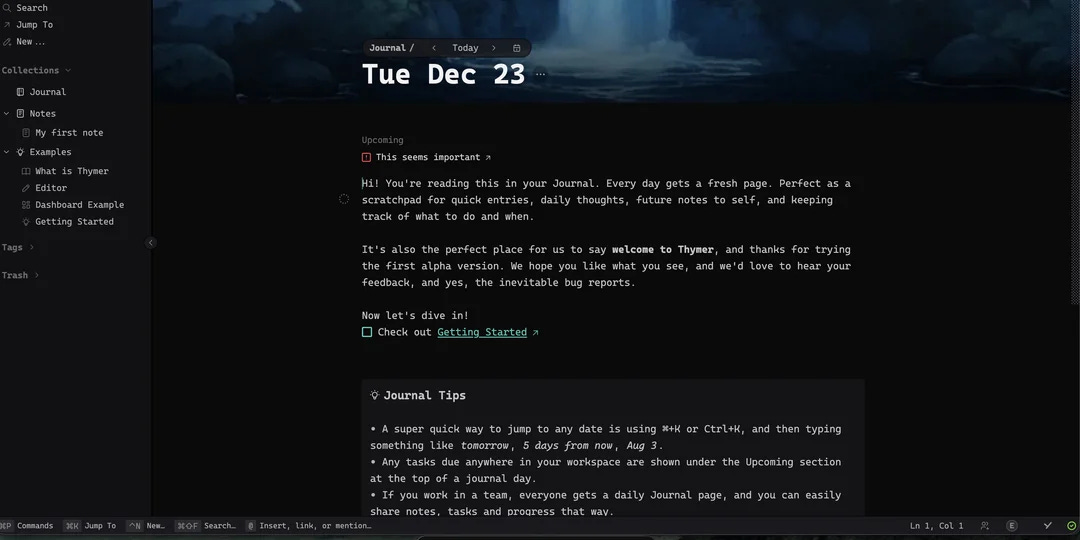
The reason for the limited opening is so that the devs can fix the most critical issues first and not be bombarded with everyone posting about the same thing. They know the limitations of invite-only access, and I am sure they are working hard to get to the next stage as soon as possible.
High-Level Roadmap
Although the devs are still working on a more refined roadmap, the following high-level next-stage road map has been communicated:
Fix alpha bugs
Release Self-hosted sync server / Ejectable
Desktop Apps (Windows, macOS and Linux)
Mobile part 1: web access
Updates
0.0.7, 29-Dec-25
New features:
Ctrl+shift+arrow up down to move item with descendants up and down (experimental)
Experiments panel for testing new features (find it in Settings → Experiments)
Experimental: Outliner Enter behavior - pressing Enter on nodes with children adds a child instead of a sibling
Bug fixes:
Insert line after folded item doesn’t unfold the item
Various date/time related fixes
Open block menu with keyboard shortcut
PWA title bar color in light/dark mode
Enter after folded list inserts no longer unfolds
Indent lines no longer invisible in light mode
Error while displaying error message in live search query block
Known bugs we’re working on:
copy-paste doesn’t work right (or not at all) on Firefox
meta properties in Thymer API
Endless Possibilities
Check out what Ricardo put together using the inbuilt Thymer Plugin ecosystem:


Obsidian
V 1.11.2 (Desktop and Mobile
URI:
new,open, anddailyURI actions now support a newpaneTypeparam.Fixed “Move file” selector not showing the vault root (
/) as a valid destination.Fixed bug where “No plugin updates found” toast never disappears.
Fixed minor visual regression of the sidebar tab buttons.
When navigation is hidden, swiping down from the top of the view triggers the pull down action. Tapping at the top of the view causes the navigation to reappear.
iOS: The View Note widget renders checklists with checkmarks.
The sidebar layout has been updated for tablets. The tab menu and view actions now appear at the top to better mirror the desktop experience.
Desktop and Mobile changelogs.
Shaving Time
Kepano posted about Performance is design, and every millisecond counts and how they are working hard to shave every possible second to get Obsidian running.


Obsidian Book Note Taking Practical Workflow - Effortless Notes & Quotes
Callum, aka wanderloots, shares their workflow on how to take effortless book notes in Obsidian. Taking notes while reading can introduce friction (+ other blocks), stopping you from reading in the first place. This workflow aims to overcome these blocks so you can read & remember more.
Interesting Reddit Posts
Obsidian Shutting Down? Over the past couple of days, I keep seeing Redditors talking about a possible scenario of Obsidian not existing someday. Does this expectation stem from things that have happened in the past, and am I already in trouble for thinking Obsidian will be here for the rest of my life? If so, what do you suggest are future-proof measures I should start taking?
Capacities
Capacities Docs
I don’t remember seeing this before, but Capacities Docs showcases the tutorials to get you started, the features to enable to you get the most out of them and references to the different terminology.
If you have not already see it, check it out here.
Query for Tasks by their context
Is there a way to query for Tasks by their context? Specifically, I want to query tasks that are not part of a project. If I’m using tasks in a project (like I would in Jira) but they’re also showing up in my general go-to list of tasks, the latter gets bloated, approaching unusable
The devs responded with “yes this is planned and will come with one of the next releases” . Discord.
Good to see improvements being made in the Task Management feature.
TANA
2025 Recap
2025 has been a big year for us. We launched! And shipped a lot of things. Check out the full recap in our Tana 2025 Wrapped Blog Post, along with our recent Founder AMA with Olav. We’re also so close to Product of the Year on Product Hunt
Tana are also currently the second most-voted product of the year, not far off number 1! Many of you have already voted but if you haven’t and have an extra minute, it would mean a lot to the team if you could vote to help get over the line:
https://www.producthunt.com/products/tana/launches/tana-2
Impressed with Tana + question regarding historical database of dates
OP posted: My main use case for Tana (and PKM tools in general) is for researching and writing, academically and otherwise. I therefore read a lot, take notes on this literature and use those notes for writing my own texts. When taking notes, I try to always make pages/nodes for mentioned dates, like [[1970]] or [[May [[1970]]]].
I’ve began doing this during my Roam Research days and it works reasonably well. By opening the node/page of a certain year or month, I can get a quick overview of different events mentioned in different books and articles.
Logseq
Hands-on with Logseq DB for iPhone: 2025 Walkthrough
Danzu posted a complete walkthrough of the Logseq DB version on iOS!
In this video, we dive into the new mobile interface and test out the core features of the database version running on iPhone.
In this video, he covers:
User Interface Overview: A tour of the new bottom navigation bar, including Home, Graphs, Capture, and Go To.
Settings: How to configure the mobile app for your workflow.
Graph Management: Switching between graphs and managing your database on the go.
Outlining & Views: Demonstrating the fluid outlining experience and different data views.
Quick Add Features: How to rapidly capture information using the new tools.
Audio Recording: Testing the built-in voice note capabilities.
db auto backup on desktop
This PR adds automatic database backup functionality for desktop (Electron) users. When databases are saved on desktop, they are now automatically backed up with intelligent retention policies.
At the same time, it disables internal Git backup for db graphs since it’s confusing and not reliable compared to hourly/daily backup. Users can still use external Git to backup.
Interesting Reddit Posts
Unfortunately, this week there were a few Reddit posts of people expressing some displeasure with Logseq and potentially looking for alternatives:
What are you planning to replace Logseq with ? - Over the past few years, I've read a lot of complaints about Logseq being a stale project or sh**ified. The application has not changed since I started using it in 2023. No communication from the devs, no roadmap update, nothing.
I’ve had enough - I am a long-time backer of Logseq. I don’t need new features. I was just happy with it as it was and hoping that some bugs would be solved.
Octarine
v0.31.1 out now!
Writing Assistant
No longer requires a note to be open for access.
Quick actions are now suggested to quickly start chats, with actions tailored depending on whether context is attached.
You can now edit past prompts to restart the query and message history from that point with your new input.
History search now searches within the responses and queries of messages.
A copy button is now available for one-click prompt copying (you can still select text to copy as before).
When using the assistant with no file open, the response quick actions include a new
Create note from responseoption.
Ask Octarine
Slight design and layout update: model name and timestamp for queries are now more clearly displayed.
Suggested actions now feature distinctive icons.
History search now also matches inside responses and chat queries.
And more - changelog.
Heptabase
A few updates in Heptabase, including:
Whiteboard: AI action for cards
Remove the GPT-4.1 model.
Refine the Tag app’s design.
Improve onboarding experience.
Also check out this video by Tom on Heptabase killed NotebookLM and Mem (Best AI Note-Taking App 2026).
Noteey
The devs are working on the next release, expected by 10 January 2026. Some important features will finish testing and be merged, including:
Perfect markdown importer and exporter
Bidirectional conversion between markdown and mind maps
Connection line support Elbow
Transcript support for video and audio files
Configurable interval for automatic database backups
Much better text element experience in the whiteboard
Many whiteboard and mind map bug fixes
Reader (Readwise)
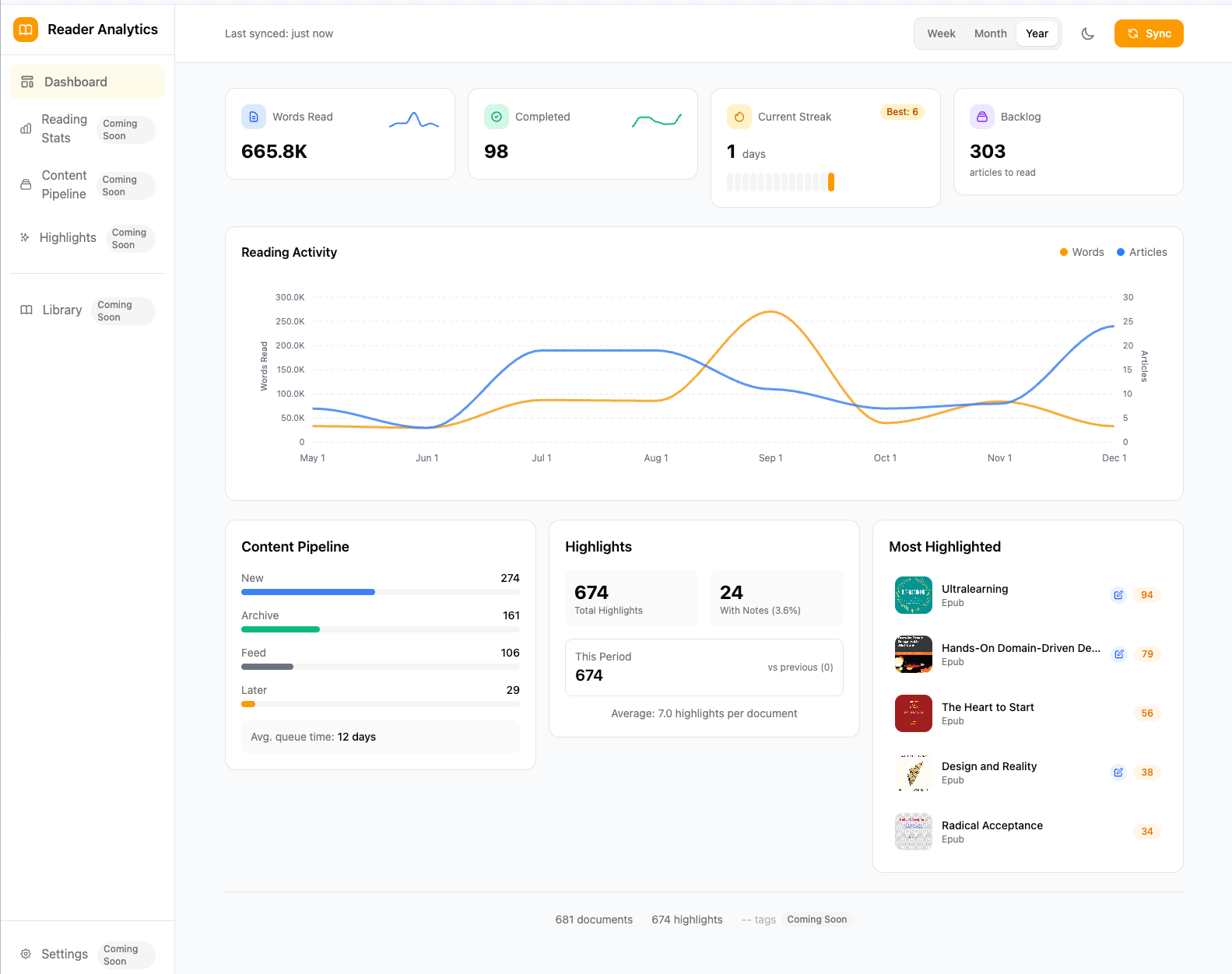
Readwise Reader analytics dashboard? OP went and built a dashboard for reading velocity, streaks, pipeline metrics, and highlight patterns.
3 big (and many small) upgrades to Reader mobile app
These will make our iPad and tablet reading experience smoother. See details here.
That’s all for this week. Thank you very much in advance for reading and I look forward to bringing you more PKM news next week.