Hi Everyone,
We are back with another episode of PKM Weekly. Let’s see what is in store for us today.
Today will be a short and sweet episode - a bit too much going on and need to prepare myself for the grand F1 finale! Abu Dhabi title decider once again. Amazing stuff.
Obsidian
How does Obsidian CEO (Kepano) Take Notes?
Karlos provides us with a step-by-step guide on how they believe Kepano uses Obsidian to take notes.
Being the CEO of the coolest notetaking software out there must come with its wisdom. Truly, there is so much to learn about the vault of Kepano (Steph Ango).
Enjoy a highly detailed step-by-step tutorial on how to use his system. No previous obsidian knowledge required.
The real answer to syncing Obsidian
A bit of a reality check on syncing with Obsidian - just use Obsidian Sync.
I see so many people posting about sync problems because they’re trying to DIY a solution with iCloud or other catch-all services.
Obsidian Sync is designed for Obsidian, and it solves nearly all sync issues.
You save time, avoid headaches, and support an amazing company. The prices are extremely low for what you get.
Full Link
Capacities
Web Highlighting in Capacities
Web Highlights is a popular Chrome extension that enables you to highlight websites. In this video Beth shows us how to make the most of it:
Server Outage
Capacities had a bit of a server outage yesterday for a few hours. Seems that everything is back up and running smoothly.
TANA
Tana Updates
Added AI image generation via Nano Banana Pro from Google Gemini. Transform any node into banners, infographics, diagrams, or any other image. Configurable resolution (up to 4K) and 11 aspect ratio options. Now used in built-in image commands across Tana and in the custom command ‘Generate image(s) with AI’.
New Recents view in sidebar shows last 100 created/edited items across workspaces. Uses list navigation view and is sorted and grouped by last edited time.
Sidebar enhancements: Resize by dragging (size persists per device), fully collapsible with Cmd/Ctrl+\, and customizable items in top section (right-click to hide/show any element). Reset width or toggle visibility via command line.
Frustrated Tana Believer
OP posted a deep reflection on their thoughts with Tana:
I’m writing as someone who genuinely believed in Tana’s vision. I invested significant time learning your system because I saw its potential. That belief has eroded into frustration, and I want to explain why along with concrete solutions I hope you’ll consider.
The learning curve is treated as a feature, not a problem to solve.
Logseq
Updates (2025-11-16 to 2025-12-06)
This release delivers three transformative initiatives that significantly enhance Logseq’s security, mobile experience, and developer tooling:
End-to-End Encryption (E2EE) for Real-Time Collaboration - Full implementation of end-to-end encryption for synced graphs, ensuring your collaborative data remains private and secure. E2EE password management is seamlessly integrated with system keychains on both desktop and mobile, includes RSA key-pair generation, AES encryption for graph data and assets, and a “forgot password” recovery option.
Native iOS Navigation & Bottom Sheets - Complete redesign of the iOS mobile interface with native UIKit components, replacing the previous web-based Silk framework. This brings smooth native animations, improved gesture handling, dynamic tab system with native bottom sheets, enhanced accessibility with iOS Dynamic Type support, and significantly better performance.
Logseq CLI Enhancements - Major improvements to the command-line interface including new validation commands for graph data quality, API mode for export-edn, better error messages for unspecified graphs, and enhanced graph validation with closed-value checking.
Check the full changelog. Thanks Danzu for posting.
Does Logseq Need a New Community Manager?
Post from OP “An open request to the Logseq Team: We need an active bridge between the team and us users”
Please consider hiring a community ambassador/manager who answers everyone’s questions and keeps an active relay between dev and users. I vote for Danzu!
And quick question - when DB is released, is there an official path to migrating or are we expected to start fresh?
A great post and lots of great responses.
AppFlowy
v0.10.5 is out! This release comes with exciting updates
AI Transcript: Turn audio and video recordings into ready-to-share notes with AI Transcribe.
Incorporate manual notes as human provided context
Translate the AI summary into different languages
Configure the summary’s level of detail
Easily use our rich-text editing features to refine both the AI transcription and summary
Share and edit with other collaborators
PDF Block
Upload or embed PDF files, then view and interact with them directly inside your document
Math Equation with an easier-to-use UX and new features
Multiline equations and more environment variables
Block and inline math equation markdown support
Ask AI to check and explain equation
Improved Image Block with new features and more polished UX
Captions, embedded external or page links
Save and replace images
Larger drag area to adjust the image size
Mobile-friendly action menu
Upcoming releases
AI real-time meeting notes
Video and audio embeds in the document
Page version history: restore to an older version
Work in progress
Refactor the code related to database components
Fix known database issues: linked views, filters, and syncing
Kosmik
We’re thrilled to introduce Kosmik 1.0.0, a major milestone that brings significant improvements to your visual workspace experience. This release focuses on stability, monetization, and enhanced user experience across the platform.
Special thanks to our community for the valuable feedback that shaped our releases throughout the beta. Several fixes & improvements were driven directly by user reports.
V1 includes the Paid Plans & Monetisation and Timeout handling implemented for universes with multiple text items to prevent application freezing
Heptabase
Big updates to Heptabase:
“Research a topic” button on the left sidebar. This opens an interface where you can upload many types of sources: PDFs, YouTube links, documents, images, and more (Web Cards and EPUB support are coming soon!).
AI suite of tools to use during its thinking process. Our AI can search your entire knowledge base using both keyword and semantic search, perform deep search inside specific PDFs, and intelligently decide to read more pages or look for more notes when needed.
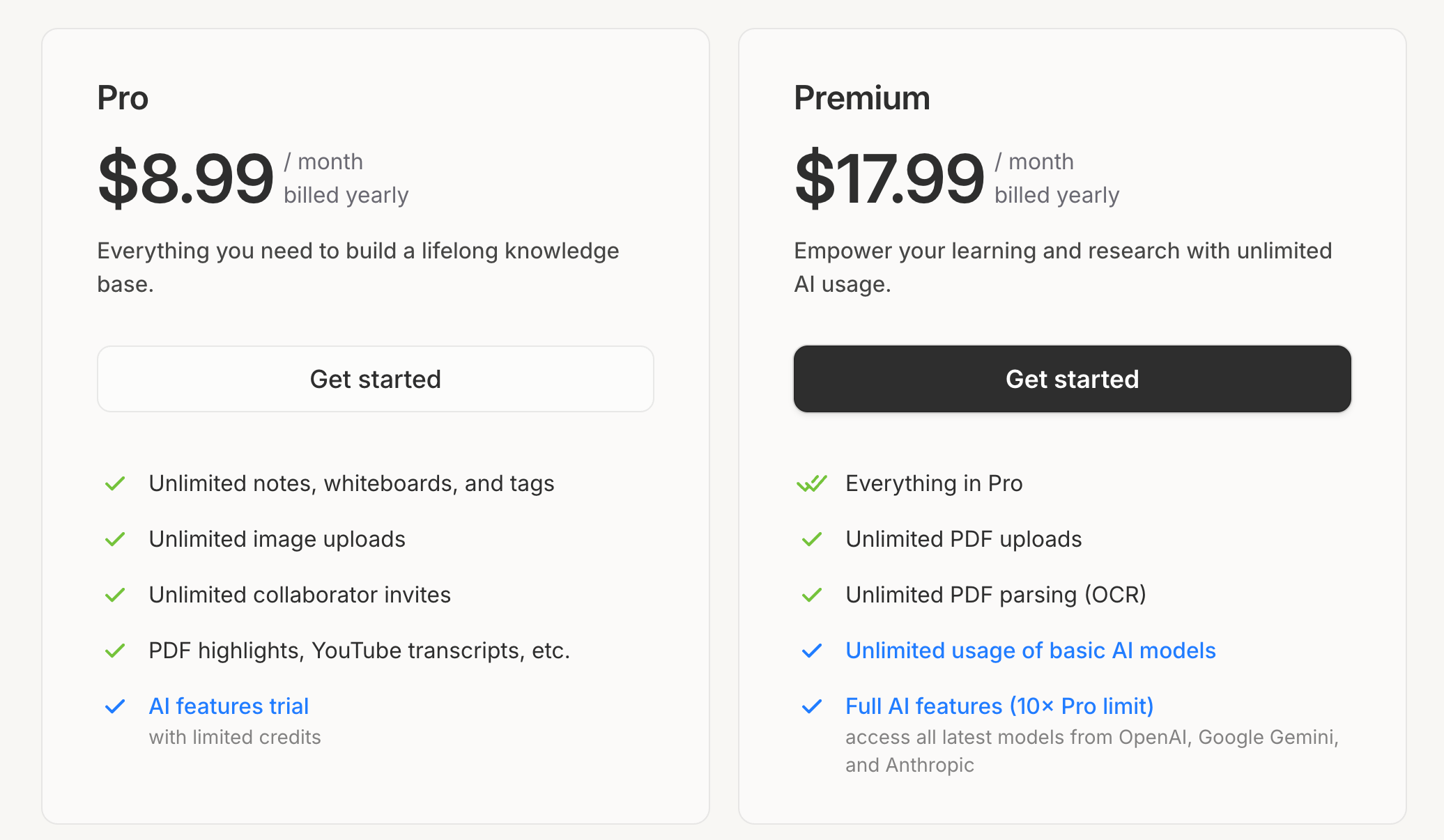
Collaborating with Google to give all Pro subscribers and free trial users a monthly AI credit. You can now chat with the most advanced Google Gemini models at no extra cost. If you hit the monthly limit, you can upgrade to the Premium Plan, which gives you 10× the Pro usage limit plus access to all the latest models from Google, OpenAI, and Anthropic.
Introduce the Premium plan (Please check 👉 Pro and Premium Plans: Pricing & FAQ)
Noteey
Noteey V1.41.0 is now available to update! V1.41.0 20251202 New Features and Improvements:
You can now quickly add link to selected text in cards using Cmd/Ctrl+V.
When copying card highlights/PDF highlights as text, line breaks are now preserved.
Improved the interaction and logic for copying cards on the board.
When creating new text elements on the whiteboard, the last used font and size will be remembered.
When adjusting text element font size on the whiteboard, the text box now adjusts automatically.
The board’s TOC(table of contents) list now supports resizing by dragging.
Improved the display logic for image titles in the whiteboard’s content list.
Enhanced the appearance of connection lines in dark mode.
Craft Docs
Craft has released a series of mini videos on using Craft. A great idea to level up our Craft usage in the shortest time possible.
Check them out here:
https://www.youtube.com/@craftdocs/videos
That’s all for this week. Thank you very much in advance for reading and I look forward to bringing you more PKM news next week.
Re the Logseq community manager: they did used to have one right? Ramses Oudt? Not sure what happened there, but guess it was a voluntary position and it takes up a lot of time to do it well. It should be a paid position, but I guess Logseq don’t have the spare cash. I wonder if they plan to seek another funding round or if they’re putting all of the eggs in the future Logseq Pro subscription basket?